
If your Roku Ultra is trapped in a perpetual boot loop, stuck on the shimmering purple logo, don't rush to the checkout page for a new unit; many common streaming device issues, much like when a Chromecast with Google TV 4K is stuck in a boot loop, can often be resolved with troubleshooting. In most cases, a hardware-level factory reset—triggered by the physical pinhole button—will break the cycle. Locate the small button on the back or bottom of the device, hold it for 20+ seconds while powered on, and wait for the status light to blink rapidly. This forces a clean state by wiping the local partition and clearing the firmware cache.
The Anatomy of a Boot Loop: Why Your Roku Ultra Fails During Initialization
The Roku Ultra is often marketed as the "flagship" of the streaming ecosystem, but under the hood, it’s a high-performance Linux-based embedded system that lives or dies by its NAND flash memory health and connectivity stability, which can be compromised by issues such as HDMI handshake problems. When a device gets stuck on the logo screen, you are essentially witnessing a failure in the kernel initialization sequence.
The Roku OS (a proprietary build of Linux) performs a series of "health checks" during boot. It verifies the integrity of the filesystem, mounts the user data partition, and attempts to reach the Roku update servers. If the update was interrupted—perhaps by a localized power sag or a DHCP timeout—the system may enter a state where it expects an updated component that isn't actually there, leading to the infinite splash screen.
Identifying the Difference: Soft Crash vs. Kernel Panic
Not every "stuck on logo" issue is identical. Understanding the nuance is key to deciding whether you need a simple restart or a full nuclear reset.
- The Soft Hang: The logo appears, perhaps the animation stutters, and the remote stops responding. This is often an application layer issue where a rogue channel (app) has tried to claim too many system resources on boot.
- The Kernel Panic (The "True" Stuck): The logo screen stays static for longer than five minutes. If you hear no audio feedback and the remote's IR/Bluetooth signals elicit no response, the system has likely failed to load the core GUI environment.
In the case of the Kernel Panic, the "pull the power cable" trick (power cycling) is merely a placebo. It clears the RAM, but it doesn't touch the corrupted temp files sitting in the NAND memory. This is where the physical Factory Reset becomes mandatory.
The Operative Mechanics of the Factory Reset Button
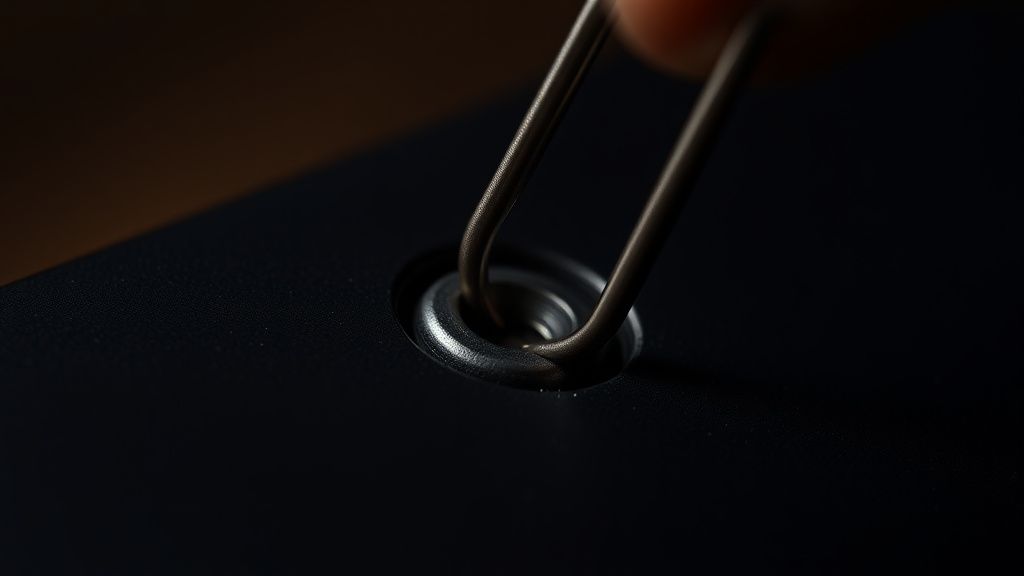
Contrary to popular belief, the "Reset" button on a Roku Ultra is not a simple software trigger. It is a physical override connected directly to the motherboard's management controller. When you press and hold this button for 20-30 seconds, you are sending a low-level signal that tells the bootloader to ignore the current user-partition state and reload the factory image from the protected recovery partition.
The Step-by-Step Execution:
- Power Persistence: Keep the device plugged into power. Do not disconnect the power cord.
- The Tactile Feedback: Find the recessed button. You will need a paperclip or a SIM-eject tool.
- The Timing Window: You must hold the button while the device is powered on. If you press it after the device has already hung for ten minutes, it may not register.
- The Indicator Light: Watch the front LED. It will usually blink in a specific sequence (often a rapid flicker) to signal that the partition wipe has been initiated.
Field Report: The "Update-Brick" Phenomenon
On forums like Reddit's r/Roku and several technical subreddits, a recurring theme appears after major OS version rollouts (e.g., the jump to Roku OS 12+). Users report their Ultras becoming "ghosts"—they power up, show the logo, and then turn black.
One user on a developer mailing list noted: "The issue isn't always the firmware itself, but the filesystem metadata corruption caused by the power-management controller cutting power before the write-cycle finishes."
This exposes a critical weakness in Roku's architecture: Atomic commits. When the system updates, it doesn't always have a robust "A/B" partition system that allows for a seamless rollback if the update fails. If the write fails halfway, you are left with a corrupted boot sector, and the hardware-level factory reset is the only remaining lifeline before the device becomes an expensive paperweight.
Infrastructure Stress: HDMI Handshakes and DHCP Timeouts
One of the most ignored causes of "stuck on logo" issues is the HDMI handshake failure. If your Roku Ultra is connected to an older receiver (AVR) or an early 4K TV, the communication between the devices during the "handshake" can time out.
If the Roku is waiting for a response from the TV regarding HDCP (High-bandwidth Digital Content Protection) 2.2/2.3 keys and that signal isn't returned within a few milliseconds, the OS may hang.
- Workaround: Unplug the HDMI cable while performing the factory reset. Boot the device "blind" and only plug in the HDMI once you see the status light change state. This forces the device to prioritize its internal boot sequence over the display negotiation.
Counter-Criticism: Why Roku’s Reset Policy Is Controversial
There is significant debate in the enthusiast community regarding the lack of a "Safe Mode" or a "Recovery Menu" similar to what you find on an Android TV or an Apple TV. On an Apple TV, for instance, you can connect the device to a Mac/PC and use iTunes or Apple Configurator to perform a deep-level firmware restore.
Roku, by design, keeps its ecosystem locked. The company’s philosophy is "it should just work." When it doesn't, the only "official" path is the factory reset—which deletes all user data, saved passwords, and customized home screen layouts.
Critics argue this is a dark pattern of convenience. By forcing a factory wipe instead of offering a "repair OS" option, Roku avoids the overhead of managing specialized support tools for the average consumer. However, for power users who have dozens of channels and complex login configurations (especially those who don't utilize Roku's cloud sync effectively), this is a massive operational friction point.
Scaling Failures and Long-Term Reliability
As the Roku ecosystem ages, we see more "fragmentation" issues. Older Roku Ultra models (the 4660X, for example) are struggling with the bloat of newer OS builds. The RAM overhead required for modern, high-bitrate streaming apps has pushed these older CPUs to their thermal and memory limits.
When the device runs out of memory during a boot-up sequence, it triggers an OOM (Out of Memory) killer mechanism, which often terminates critical system processes, landing you back at the logo screen. If you have an older unit, a factory reset might fix it for a few weeks, but it is often just a temporary reprieve from inevitable hardware degradation.
The "Silent" Fixes: Firmware vs. User Interaction
Sometimes, the "stuck on logo" issue isn't the hardware at all. It’s the interaction between the remote's persistent pairing request and the console.
There are documented cases where a faulty Roku remote with a "stuck" button (a button that is physically jammed or experiencing electrical shorting) sends a continuous signal to the unit during boot. This can interrupt the bootloader's polling sequence.
Pro-tip: Before attempting a factory reset, remove the batteries from your remote. If the device boots up correctly without the remote, you’ve found the culprit: a hardware fault in the remote, not the player. This simple diagnostic step saves hours of configuration restoration.
Analyzing the Ecosystem: Why Platforms Resist "Fixability"
This problem isn't unique to Roku. We see it across Amazon Fire TV, Chromecast, and various Smart TV platforms. The shift toward "Appliance Computing"—where the software is tightly coupled to the hardware—means that user control over the recovery process is intentionally minimized to reduce support costs.
However, this creates a "trust erosion." When a user experiences a boot-loop, their immediate reaction is to discard the hardware and switch to a competitor. Roku’s reliance on the physical reset button as a "one size fits all" solution is a relic of early 2010s design. In an era where devices should be self-healing, the lack of an intelligent recovery partition remains a significant technical debt for the company.
Q: Does a factory reset wipe my Netflix and YouTube account data?
Technically, yes, it unlinks the accounts. However, because most streaming services like Netflix, Hulu, and YouTube store your watch history, recommendations, and preferences on their own cloud servers, you will not lose your history. You will simply need to log in again after the setup process is complete.
Q: Why does my Roku Ultra get stuck after an update?
Updates involve rewriting parts of the internal flash memory. If the process is interrupted—due to a brief power flicker, a network drop, or a sudden cache overflow—the OS can end up in a "corrupted state" where it cannot find the boot files it needs to proceed to the home screen.
Q: Is there any way to save my data before a factory reset?
Unfortunately, if the device is stuck at the logo, there is no "safe mode" or file-explorer access to back up your personal settings. Roku does not currently support offline backups of device states. This is a known limitation of the platform's architecture.
Q: My Roku Ultra is still stuck even after a reset. What now?
If the reset process finishes, the device goes through the setup, and it immediately hangs again upon downloading updates, you likely have a hardware failure in the NAND flash chip itself. At this point, the device is physically defective, and no amount of software manipulation will fix it. Contacting Roku support for a warranty claim is the only remaining step.
Q: Can I use a USB drive to recover the firmware?
Some high-end Roku TVs have a USB port for firmware recovery, but most Roku Ultra set-top boxes do not support end-user firmware flashing. Do not attempt to force-flash generic
.binfiles found on random forums; these are often for specific regional models and will permanently "brick" your device.
The Human Element: When to Give Up
Finally, it is worth acknowledging the emotional frustration of a dead media device. It sits at the center of the living room, often representing the only way a household consumes media. When it fails, the "factory reset" is the final, desperate act.
If you find yourself resetting your device once a week, stop blaming your internet, stop blaming the router, and stop blaming your patience. You are dealing with a hardware unit that is physically nearing the end of its life cycle or is suffering from a bad batch of flash memory. While the reset button is a powerful tool, it is not a cure-all. Sometimes, the most professional decision is to acknowledge that the hardware has reached its limit and move on to a system with better long-term reliability.
Bu makale affiliate linkleri içermektedir.