
Quick Answer: If your Roku Ultra is stuck in a reboot loop, the fastest fixes are: force a factory reset using the physical reset button (hold 10–15 seconds), remove the device from power for 90 seconds, check for a corrupted system update, or eliminate HDMI handshake issues by swapping ports. Most persistent reboot loops resolve with a full factory reset and fresh channel reinstall.
There's a particular kind of frustration that hits when you sit down to watch something — end of the day, couch, remote in hand — and your Roku Ultra just keeps rebooting. Not once. Not twice. It loops. The Roku logo appears, fades, reappears. Sometimes it gets past the home screen for forty seconds before crashing again. Sometimes it never makes it there.
This isn't a niche problem. Threads across Reddit's r/Roku, Roku's own community forums, and Hacker News comment chains going back years document the same pattern: Roku Ultra units — particularly the 4K HDR flagship models — hit reboot loops after firmware updates, channel installs, overheating incidents, or what appears to be nothing at all. Devices that worked perfectly for two years suddenly become expensive bricks.
The underlying causes are more varied and technically interesting than most support pages admit. And the "fixes" that get copy-pasted across the internet often miss the actual problem entirely.
What's Actually Happening When a Roku Ultra Reboot Loops
The Roku Ultra runs a Linux-based OS on ARM hardware. The system has a watchdog timer — a hardware-level component that monitors the main processor and forces a reboot if the OS stops responding within a set interval. This is intentional safety behavior designed to recover from crashes. The problem is that when the root cause of the crash isn't resolved, the watchdog kicks in, reboots the system, the same crash happens again, and you're stuck in a loop.
The loop isn't random. It's the device doing exactly what it was designed to do — just on repeat, because the underlying trigger never gets cleared.
Common root causes include:
- Corrupted firmware or failed OTA update — A partial update that wrote bad sectors to NAND flash memory
- Corrupted channel data — An installed app (often a third-party private channel) with a bad cache entry that the OS tries to load at boot
- HDMI CEC feedback loop — The TV sends an unexpected CEC signal that confuses the Roku's boot sequence
- Overheating — Internal thermal sensors triggering protective shutdowns before the system fully initializes
- Power delivery problems — USB power (if used instead of the included adapter) providing insufficient or unstable current
- Hardware failure — NAND flash degradation on older units, capacitor issues
Understanding which category you're in determines which fix will actually work. This is where most guides fail — they give you a list of steps without explaining the diagnostic logic.
The Diagnostic Layer Most Guides Skip
Before you start pressing buttons, observe the reboot loop behavior carefully. The timing and visual pattern of the loop tells you a lot.
Does the device reboot before showing any logo? This points toward a power delivery issue or severe hardware failure. The bootloader can't initialize.
Does it reboot during or immediately after the Roku logo? Likely a corrupted firmware image. The OS is partially loading, hitting a bad memory block, and the watchdog resets it.
Does it reboot after the home screen appears? A channel or background process is crashing post-boot. This is the most recoverable scenario — and the most common complaint pattern documented in Roku Community forum threads like "Ultra 4800X keeps rebooting after home screen loads" (dozens of variations of this thread exist, going back to at least 2019).
Does it reboot only when a specific channel is opened? Channel-specific crash. The fix is targeted.
Is the device hot to the touch? Thermal shutdown. Power and ventilation are the priority.
This diagnostic tree changes your entire approach. Don't start with a factory reset if the device isn't even loading the OS — a factory reset won't help and you'll waste twenty minutes. Don't swap HDMI cables if the crash happens before HDMI negotiation begins.
Fix 1: Power Cycle With Extended Discharge
This sounds too simple. It also fixes a surprisingly large percentage of cases, including some that look like permanent hardware failures.
Unplug the Roku Ultra from power — not just turn it off, but physically remove the power cable. Leave it unplugged for 90 seconds minimum. Some community members report needing 3–5 minutes for capacitors to fully discharge on older units.
During this time, also unplug the HDMI cable from the television. HDMI ports can deliver a small trickle of power even when the TV is off. On some units this is enough to prevent full discharge.
Plug everything back in — power first, then HDMI — and observe.
If this fixes the loop, the cause was likely a transient OS state issue, memory corruption that clears on full power loss, or a CEC handshake problem that reset itself. Don't celebrate too hard — if it recurs within 48 hours, you have a deeper issue.
Fix 2: HDMI Port and CEC Isolation
HDMI Consumer Electronics Control (CEC) is responsible for more Roku instability than Roku's documentation will acknowledge. Roku calls their CEC implementation "Roku TV Private Listening" and "One-Touch Play," but the underlying standard is notoriously inconsistent across TV manufacturers.
Here's what happens: some televisions — particularly certain Samsung, LG, and Sony models from 2018–2022 — send CEC wake signals or power commands that Roku's firmware interprets incorrectly during the boot sequence. The Roku tries to respond, hits an unexpected state, and crashes.
To isolate this:
- Connect the Roku Ultra to a different HDMI port on the same TV
- Go into your TV's settings and disable HDMI-CEC entirely (it's called Anynet+ on Samsung, Simplink on LG, Bravia Sync on Sony)
- If you have another TV available, test the Roku on that device entirely
If disabling CEC stops the reboot loop, you've found your culprit. The permanent fix depends on whether a Roku firmware update eventually addresses the specific CEC compatibility issue — which may or may not happen depending on how niche the TV/Roku combination is.
Fix 3: The Factory Reset Button (Not the Remote Sequence)
There are two ways to factory reset a Roku Ultra. Most guides lead with the software method (Settings > System > Advanced System Settings > Factory Reset). This is useless if the device can't boot far enough to reach that menu.
The hardware reset button on the Roku Ultra is the critical tool here.
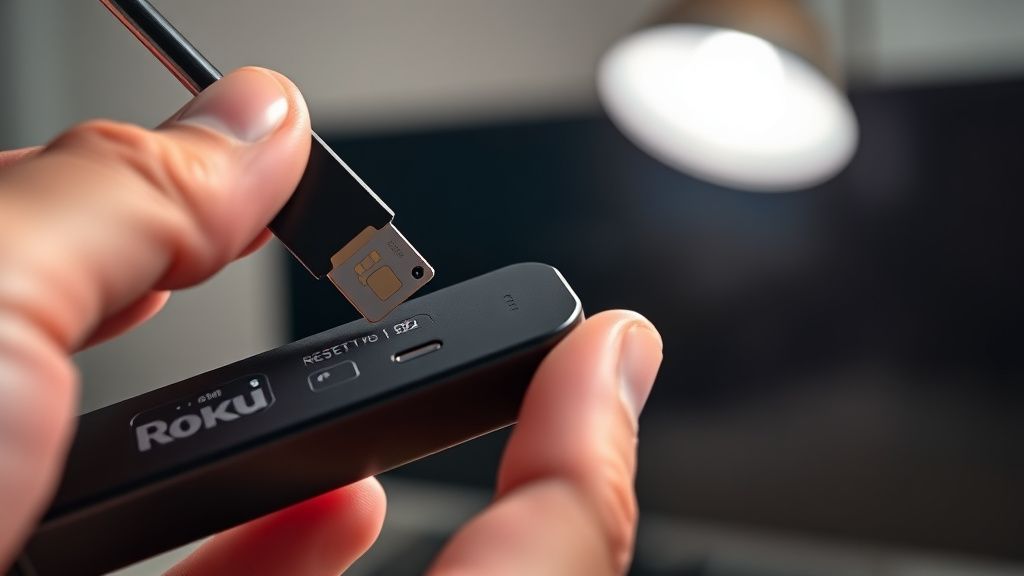
Locate the physical reset button — on the Roku Ultra, it's typically a small pinhole on the bottom or side of the device (exact location varies by generation; 4660X, 4800X, and newer models differ slightly).
Procedure:
- With the Roku Ultra plugged in and in its reboot loop, use a straightened paperclip or SIM tool to press and hold the reset button
- Hold for 10–15 seconds — you should see the status LED flash, and the device will enter reset mode
- Release and wait. The device will perform a factory reset and reboot. This takes 3–5 minutes.
This is the fix for corrupted channel data, partially corrupted firmware, and bad cache states. After reset, the device boots into the initial setup wizard with a clean OS state.
What you lose: All installed channels, account settings, display calibration, network credentials. You'll need to log back in to your Roku account and reinstall your channels. If specific channels were the source of the reboot loop, don't reinstall them all at once — add them one at a time and test for stability between each install.
Fix 4: Firmware Corruption and Recovery Mode
This is where things get complicated, and where Roku's documentation becomes genuinely unhelpful.
Roku Ultra devices don't have a widely documented recovery mode like Amazon Fire TV or Apple TV. There is no published method to reflash the firmware from a USB drive or boot from external media. Roku's OS update mechanism is OTA-only from Roku's servers, which creates a real problem: if a bad OTA update is what caused the loop, the device may need to reach the internet to pull a corrective update, but it can't boot far enough to connect to Wi-Fi.
This is a known issue. Roku Community threads — including a now-archived thread from 2021 that accumulated over 300 replies — documented a wave of Roku Ultra devices entering reboot loops after a firmware rollout, with the only official resolution being a hardware replacement through Roku support.
What you can try before contacting support:
- Connect via Ethernet (the Roku Ultra has a physical Ethernet port, which is one of its key differentiators). Some units that can't complete Wi-Fi negotiation fast enough during boot can establish a wired connection and pull an update.
- After a factory reset (Fix 3), during the initial setup wizard, use the wired Ethernet connection. The setup wizard will check for updates and may pull a fixed firmware version before you add any channels.
If the device completes a factory reset, connects via Ethernet, and then re-enters the reboot loop after receiving an OTA update, this suggests a specific firmware version is incompatible with your unit's hardware revision. At this point, you're in Roku support territory.
Fix 5: Channel-Specific Crash Isolation
If the reboot loop only triggers after the home screen loads — especially if it correlates with a specific channel launch or background refresh — you're dealing with application-layer crashes rather than OS-level issues.
The challenge: you often can't get into Settings to remove the offending channel because the device crashes before you can navigate there.
Workaround approach:
After a factory reset (or a clean boot), immediately go to Settings > System > Advanced System Settings and disable automatic channel updates and disable the screensaver before installing any channels. This prevents channels from running background processes that could trigger crashes during your diagnostic window.
Then add channels one at a time. Known crash-prone channels historically include certain free ad-supported TV (FAST) channels that use aggressive video preloading, some private channels with poorly maintained codecs, and channels that use DRM verification methods that conflict with Roku's PlayReady implementation.
Roku's private channel ecosystem is particularly problematic here. Unlike channels submitted through the official channel store — which go through Roku's certification process — private channels (accessed via developer mode or direct channel codes) have no technical gatekeeping. A private channel with a memory leak or bad video pipeline can destabilize the entire OS.
If you were running private channels, that's a strong suspect. After a factory reset, don't reinstall them.
The Overheating Problem Nobody Talks About Enough
The Roku Ultra's industrial design has been largely unchanged for several hardware generations. It's a compact, enclosed unit with passive cooling — no fan — that relies on heat dissipation through the chassis.
When placed in enclosed media cabinets, stacked on top of other electronics, or in rooms with poor airflow, the Roku Ultra runs hot. Internal temperature sensors will trigger protective reboots when thresholds are exceeded. The problem is that these thermal reboots look identical to software crash reboots from the outside, so users chase firmware fixes for what is actually a thermal management problem.
Signs this is thermal:
- Reboot loops that start after the device has been running for 20–30 minutes
- Device is noticeably hot to the touch
- Loops stop if you leave the device unplugged for an hour and then try again (it works briefly, then crashes again)
- Worse in summer or in hot rooms
Actual fixes for thermal issues: Move the device to an open shelf. Ensure at least 3 inches of clearance on all sides. Some users have reported success placing the device vertically against a wall-mounted TV bracket rather than horizontally on a surface, improving airflow.
Thermal throttling and shutdown on the Roku Ultra's processor (broadly Arm Cortex-based chips, though Roku doesn't publish detailed hardware specifications for retail units) doesn't gracefully degrade performance before crashing — it triggers the watchdog shutdown, which presents as a hard reboot. This is arguably a firmware design choice that trades clean diagnostics for faster recovery time.
Power Supply Issues: The Silent Killer
The Roku Ultra ships with its own power adapter specifically because USB power from a television's USB port is often insufficient. The device draws more current during high-frame-rate 4K HDR playback than it does at idle, and a marginal power source that works fine on the home screen may trigger resets during peak load.
This is documented in Roku's own support articles but rarely surfaced in troubleshooting guides. The symptom pattern: device boots fine, works at the home screen, crashes when you launch a high-bitrate stream.
Check:
- Are you using the included power adapter or a third-party USB charger?
- Is the power adapter connected directly to a wall outlet, or through a power strip or UPS?
- Is the power adapter's cable damaged or the connector loose?
Older Roku Ultra power adapters (particularly those shipped with 2017–2019 units) had documented degradation issues. A visually intact adapter can still be delivering inadequate voltage under load due to internal component aging. If you're troubleshooting an older unit, try a different 5V/2A USB-C or micro-USB adapter (depending on your unit's generation) as a test.
Real Field Reports: What the Community Actually Experienced
The gap between official Roku support documentation and what people actually report in community forums is, charitably, significant.
On Reddit's r/Roku, a thread titled "Ultra 4800X stuck in boot loop after update, tried everything, Roku support sent a replacement — new one did the same thing" from late 2022 accumulated substantial discussion. The core complaint: users who received replacement units through Roku's warranty program found those units also entered reboot loops after receiving the same OTA update that bricked the first device. The replacement fix wasn't a fix — it was the same problem deferred by a few weeks.
Several users in that thread documented a specific workaround: immediately after factory reset and during initial setup, they blocked Roku's update servers at the router level (via DNS blocking or firewall rules) to prevent the device from pulling the problematic firmware version. This kept older, stable firmware on the device. The obvious downside: this also prevents legitimate security updates and feature additions.
One Hacker News commenter in a thread about streaming device reliability described the firmware update situation as "update roulette — sometimes you get a working TV, sometimes you get a brick, and there's no rollback." This is structurally accurate. Roku has no published rollback mechanism for end users. Once a firmware update is applied, you cannot downgrade.
The Roku Community forum's official support staff responses during update-related reboot loop waves tend to follow a pattern: acknowledge the issue, request device diagnostic logs (which requires the device to boot far enough to generate them), and escalate to hardware replacement when the device can't boot. For users with devices out of warranty, this means purchasing a new unit.
Counter-Criticism and the Debate Around Roku's Update Practices
There's a reasonable counter-argument to be made here: streaming devices are consumer electronics operating in an extremely diverse hardware ecosystem, connecting to hundreds of television models with varying HDMI implementations, running thousands of third-party channel applications. Some reboot loops genuinely aren't Roku's fault — they're the result of a bad channel, a bad HDMI cable, or a power strip that introduces voltage fluctuations.
Roku engineers responding in community threads (when they do respond) make this point. And it's fair. The number of variables involved in debugging a consumer streaming device at scale is genuinely enormous.
But the counter-counter-argument is harder to dismiss: Roku controls the update mechanism entirely. Users cannot opt out of OTA updates, cannot roll back to previous firmware, and have no visibility into what changed in an update that might cause their specific hardware/TV combination to break. The power asymmetry is complete. When a firmware update causes a reboot loop, the user has almost no agency — they can reset, wait, or replace. There's no transparency, no changelog detail, no beta program for mainstream users to validate updates before deployment.
This is a design and policy choice, not a technical inevitability. Apple TV users can participate in public betas. Some Android TV devices allow sideloading of firmware. Roku's closed ecosystem is a strategic decision, and its costs become visible exactly in these breakage scenarios.
When Factory Reset Doesn't Work:
Bu makale affiliate linkleri içermektedir.